Advanced Math.JS Structures
The following advanced formulas are generally used when utilizing lists, arrays and matrices created directly into Math Expression custom variables or Google Sheet variable import.
You can create these formulas by adding new Math Expression custom variables or using several register nodes directly on the canvas.
Lists and matrices are the most useful tools in representing, referencing, and searching a given data set. Here are some common use cases for which arrays simply model possible inputs:
- Gaming:
- Items stats – cost, damage, weight, rarity, defense, ability cost;
- Minion wave attacks – number of enemies, enemy type, XP rewards, difficulty, chance of defeat;
- Inventory management – inventory size, maximum capacity, lists of stored items;
- Crafting tables – item cost1, item cost2, item costx, crafting level requirement, generated item;
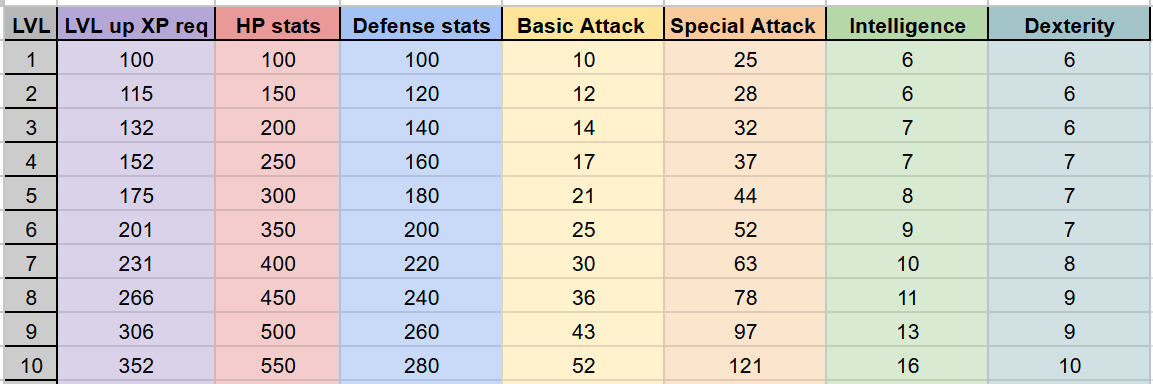
- Player stats based on level – HP, defense, basic & special attack, dexterity;
- Other industries:
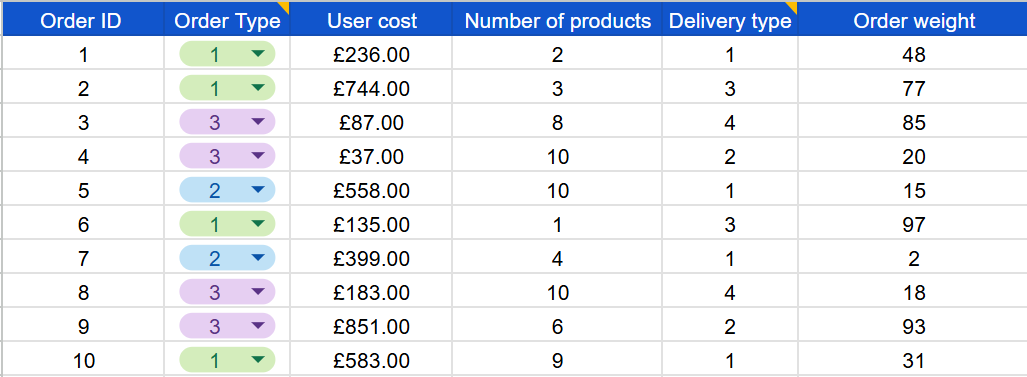
- E- commerce, shops & order management – number of purchased items, price, number of days for shipping, weight of the package, priority;
- Human resources management – name, age, salary, working hours, experience, department;
- Customer management – name, customer payment plan, customer age, activity time, engagement;
- Weather forecasting – day of the year, temperature, precipitation, wind speed, humidity;
With the modeling phase out of the way, we can now explore different operations, formulas, and structures to get specific results:
1. Generate random arrays of given length
Problem: Create a one-dimensional or two-dimensional array of a given length [X] or [X,Y] filled with random values in given ranges between min and max.
Solution: randomInt(size, min, max) where:
- size = the length of an array or matrix to be filled with the random values;
- min = minimum boundary for the random value, included;
- max = maximum boundary for the random value, excluded;


Examples:
1. randomInt([3], 1, 5) – [rand1..5, rand1..5,rand1..5] – [2, 4, 1] – generate an array of length 3 with random integers between 1 and 5;
2. randomInt([4], 10) – [rand0..10, rand0..10,rand0..10, rand0..10] – [5, 9,1,9] – generate an array of length 4 with random integers between 0 and 10;
3. randomInt([3,3], 2, 9) – [[rand2..9, rand2..9,rand2..9],[rand2..9, rand2..9,rand2..9],[rand2..9, rand2..9,rand2..9]] – [[2,5,7],[3,3,8],[1,5,7]] – generate a matrix with 3 rows and 3 columns with random integers between 2 and 9;
2. Select a single random value from a list or a random row from a matrix
Problem: Get any singular random value from a one-dimensional array(list) or a 2-dimentional array (matrix). The element should be accessible on a different register, and the initial array is not modified upon selecting the random element.
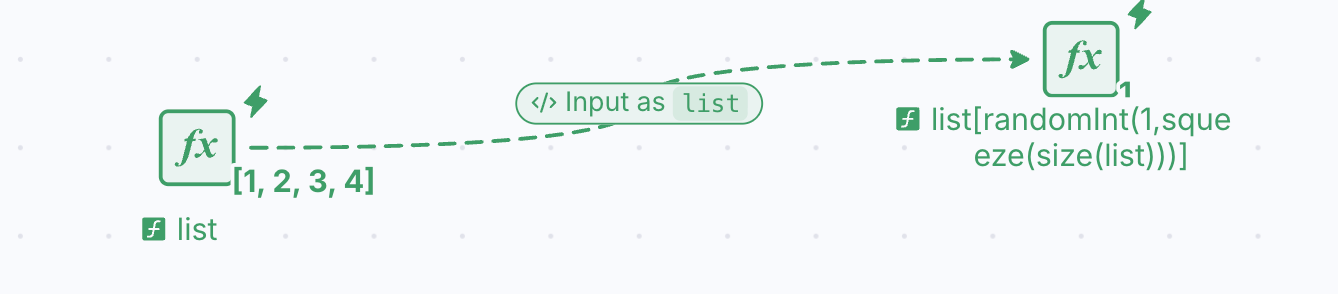
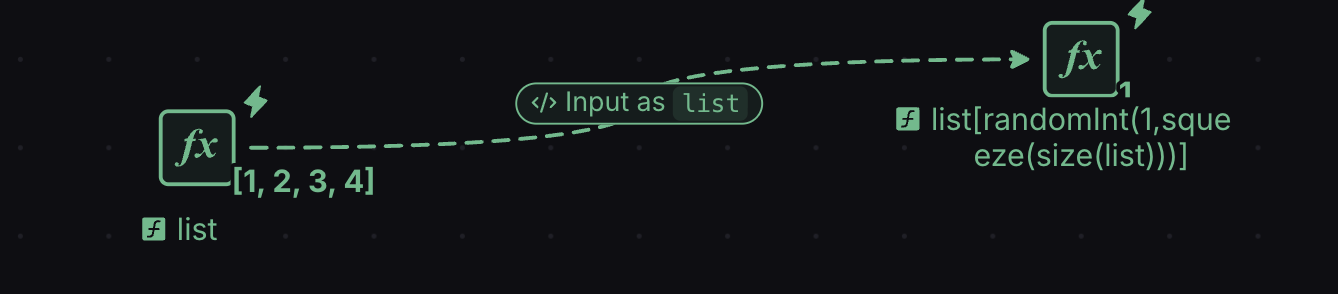
List Solution: list[randomInt(1,squeeze(size(list)))] where:
- list = the initial list of elements given as input (the pool of possible choices)
- size(list) = returns the length of the initial list to get the maximum number of possible elements to choose from – returns the result as an array with a single element
- squeeze() = a math.js function that removes the brackets [,] from matrices and lists when they contain a single element
- randomInt(1, length_list) = returns a random number between 1 and the number of elements of the list. This value is used as an index value, meaning that the function will return the actual value from the randomly generated position in the list.
Matrix Solution: row(matrix, randomInt(1,subset(size(matrix), index(1)))) where:
- matrix = the initial 2D array of elements given as input (the pool of possible choices)
- size(matrix) = returns the length of the initial list to get the maximum number of possible elements to choose from – returns the result as an array with the number of rows and the number of columns;
- subset(size, index(1)) = since the size() function returns both the number of rows and columns, we can use the subset() function and the first index to return only the number of rows
- randomInt(1, number of rows) = returns a random number between 1 and the number of rows of the matrix.


Examples:
1. list = [1,2,3,4,5]
list[randomInt(1 ,squeeze(size(list)))] = a, where a= 1,2,3,4, or 5 randomly – returns only one random element from the given list;
2. list = [100,200,300]
list[randomInt(1 ,squeeze(size(list)))] = a, where a= 100, 200, or 300 randomly – returns only one random element from the given list;
3. matrix =[[1,1,1],[2,2,2],[3,3,3],[4,4,4]]
row(matrix, randomInt(1,subset(size(matrix), index(1)))) = [a,a,a], where a= 1,2,3, or 4 randomly – returns only one random row from the input matrix;
3. Get x random rows from a 2D array
Problem: Select a given number of rows (x) from a 2-dimensional array. The rows are selected randomly.
Solution: subset(array, index(randomInt([x],1,no_rows+1),range(1, no_columns))) where:
- array = the entire inital 2D array given as an input;
- x = the number of randomly selected rows to be returned;
- no_rows = the number of rows included in the initial 2D array;
- no_columns = the number of columns included in the initial 2D array;


Examples:
1. array = [[1, 1, 1], [2, 2, 2], [3, 3, 3]]
x = 1
subset(array, index(randomInt([x],1,4),range(1, 3))) = [a,a,a] – returns only one random list from the initial 2-dimensional array with 3 columns and 3 rows.
2. array = [[1,1],[2,2],[3,3],[4,4]]
x = 2
subset(array, index(randomInt([x],1,5),range(1, 2))) = [[a,a,a],[b,b,b]] – returns 2 (x) random lists creating a new matrix from the initial 2D array with 2 columns and 4 rows.
4. Traversing a list element by element during a Play
Problem: During a Play, using a register node, reference each element on a list by traversing it one element for each step. When the final element of the array is reached, the traversal should restart from the first element of the list.
Solution: array[mod(position, size(array)[1]) + 1] and a reset of position when position==arrayLength where:
- array = the entire initial list given as input;
- position = the counter that moves the traversal forward; it is increased by 1 every Step. It is called position (not index) because index() is a math.js function;
- arrayLength = the number of elements in the array. It is called arrayLength (not size) because size() is a math.js function;
- mod(position, size(array)[1]) + 1 = the element to read. mod() keeps the read inside the array for any array length, and math.js arrays start at 1, hence the + 1;
- the reset = a Machinations construction using a Sink and state connections that sends the counter back when the last element of the array is reached;
Step-by-step guide to create the Machinations building block:
1. Create the position counter – an integer value which is incremented each Step, used to traverse the subsequent element of the list. Since “Step” == “position”, we can use an automatic source (Advance) which increases the value of a pool (Index Counter) each step by 1.
2. Reference the elements from the list using the position: Since the position is now automatically updating each step, a register (Current Value) uses the formula array[mod(position, size(array)[1]) + 1] to store the traversed element. The input position comes from the Index Counter through a state connection. Each Step the register moves on to the next element of the array, and mod() wraps the read around so it never leaves the array.
3. Send the counter back when the last element of the list is traversed: To complete this step, we must first determine the length of the list on a register (Array Length); the check below receives it as arrayLength. Next, a conditional register (End Check) performs the check position==arrayLength by referencing both values using state connections. Lastly, an activator state connection (Index Reset) whose condition is “== 1” enables a Sink node that removes all resources from the Index Counter pool when the End Check is true. The counter goes back, and the same step’s Advance adds 1.
The final building block can be observed below; in this example, the original array holds 10 values, [100,200,…,1000], and Current Value steps through 100, 200 … 1000 and then goes back to 100. Each value appears once per cycle, so the values loop once every 10 steps:
5. Find the index/position of a given element in a list
Problem: Given a list containing only distinct elements and a specific value X, return the position of the element X in the array. If the given value X is not found in the array, 0 should be returned instead.
Solution: (list==target)*(1:squeeze(size(list))) where:
- list = the entire initial array given as input;
- target = the value needed to be searched for in the list;
- squeeze(size(list)) = returns the length of the initial list as an integer value;
- 1:size = range(1, size) = traverses the indexes of the list incrementally during a single Step;


Examples:
1. list = [10,20,30,40,50,60]
target = 40
(list==target)*(1:squeeze(size(list))) = 4 returns the position in the list where the target value is found
2. list= [323,6565,3434]
target = 6565
(list==target)*(1:squeeze(size(list))) = 2 returns the position in the list where the target value is found
3. list= [1,2,3,4,5]
target = 7
(list==target)*(1:squeeze(size(list))) = 0 returns 0 if the target element is not found in the initial list
6. Count the occurrences of an element in an array
Problem: Given a constant value X, and a list with any number of elements (not distinct), return the number of occurrences of element X in the given list. If the target element is not found in the list, 0 is returned.
Solution: sum(equal(list,target)) where:
- list = the entire initial list given as input;
- target = the number you would want to search in the list;


Examples:
1. list = [10,20,10,20,10,20]
target = 20
sum(equal(list,target)) = 3 returns the number of occurrences where the target value is found
2. list= [20,20,40,88,88]
target = 20
sum(equal(list,target)) = 2 returns the number of occurrences where the target value is found
3. list= [1,2,3,4,5]
target = 7
sum(equal(list,target)) = 0 returns 0 if the target element is not found in the initial list